BioStar 2 - How to register an enrollment device
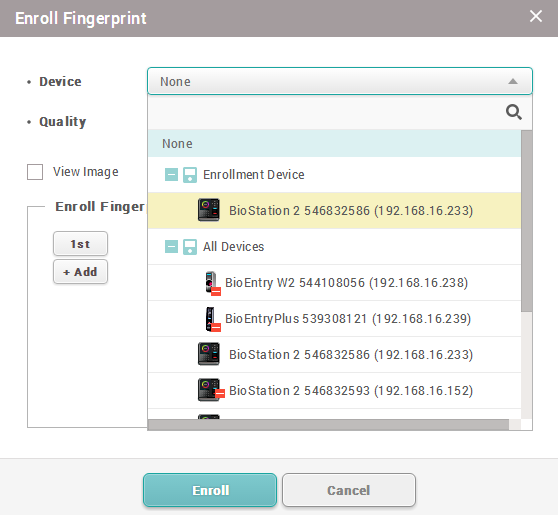
In BioStar 2, any device can be used as an enrollment device. However, in certain sites there could be tens and hundreds of device connected to the server. In this case, it will be a painful job searching through the whole list of devices to find the exact device that you need to use for the enrollment. Now, the BioStar 2 supports a feature where you can register certain devices as an enrollment device, which will show on the top of the list of the devices when selecting the device to enroll the users’ fingerprint.
Registering a device as an enrollment device
1) Go to Setting → Server → User/Device Management.

2) Click +Add button on the right and select the device you want to register as an enrollment device.
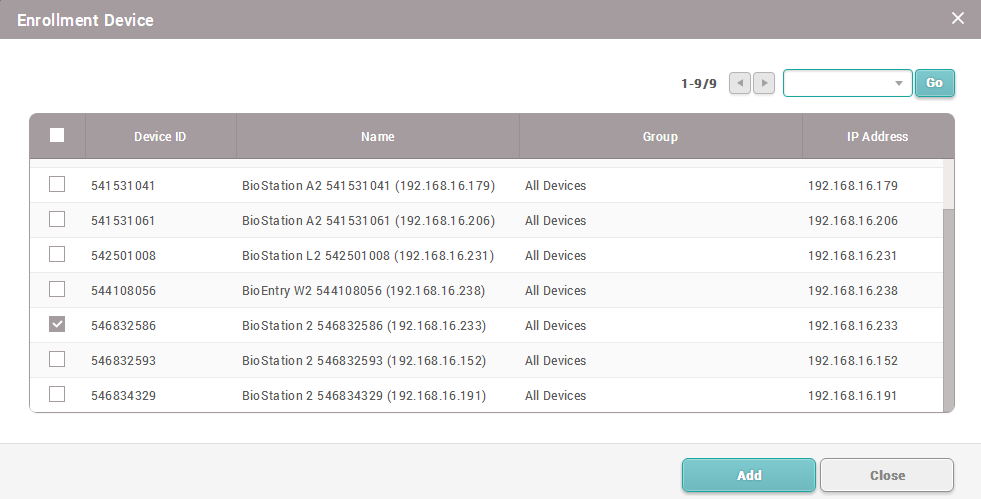
3) Click the Apply button.
Selecting the registered enrollment device when enrolling a finger
1) When entering the menu for fingerprint enroll, you will see the registered device showing on the top of the list when selecting the device to enroll the fingerprint.